This morning I woke up to find that the postman had delivered me a present.
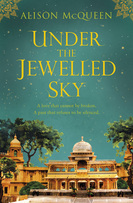
I recently entered a competition to win the latest novel by Alison McQueen - 'Under The Jewelled Sky' and I couldn't believe it when I received an email earlier this week to advise that I'd won one of five free copies.
My excitement was heightened when I saw the large package sitting at the foot of the door this morning and when I tore open the package I was greeted with this visually stunning novel. I've always loved books. There's a certain magical quality to books and I love that new book smell. Even more so, I love it that books adopt smells and memories. I remember the first time that I read 'Harry Potter and the Deathly Hallows' at 3 o'clock in the morning in a caravan in Whales and when I read 'The Hobbit' whilst hiding in my den when I was 8 years old. That age old book still smells of trees and dirt and even has a little stain from when a bird scared me when Bilbo bumped into the trolls and I accidentally dropped it in a puddle... Books have a character. They develop and grow with you much like the Never Ending Story. They nurture you and teach you about morals, friendship and courage as a child and they make you strong and encourage you to keep dreaming as you get older. So why are e-books becoming so popular?
E-book popularity has steadily grown with reports now in that digital book sales were at 22.55% last year (2012) which is almost a quarter of total book sales.
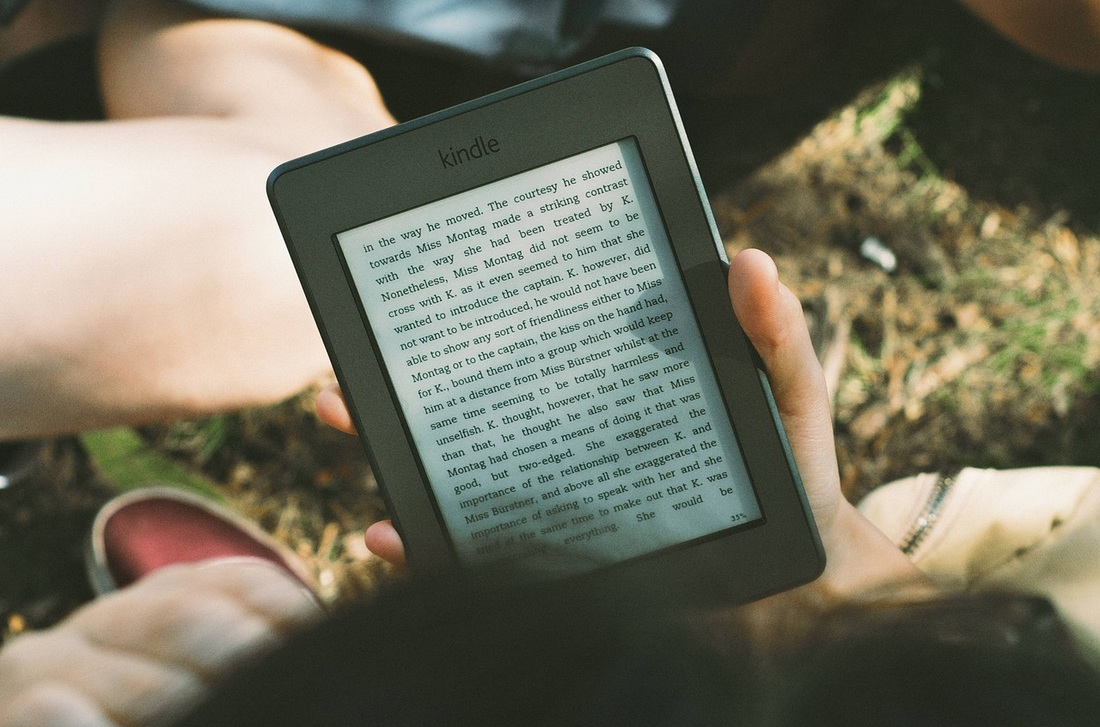
It doesn't seem like a great deal but this figure has risen from 17% in 2011 and just 9% in 2009 proving that digital e-books are becoming more and more popular as time goes by. Authors everywhere are clamouring to turn their regular books into e-books and some are missing out the printed format entirely and heading straight to digital. Don't get me wrong, if you self-publish your e-book the costs can be considerably less than the traditional publishing methods; I've even considered doing it myself as an easier avenue into the dangerous world of book publishing but is it a good idea? I didn't want to write a biased review of e-books based solely on my blinded opinion so I decided to do my research and got my hands on an iPad loaded with Amazon's Kindle. The Amazon Kindle has been voted as the best e-book reader but I wanted to give it a fair test and decided to try both the Kindle and the Apple iBooks app. Me, My Kindle and iPad
Okay, quick first impressions. I already told you that I have Kindle on the iPad so I'm not actually testing a Kindle device in person but from looking at the images of the Kindle Fire HD 7 (long name) on the web it looks pretty much the same as an iPad but less impressive and at only £120 less than the new iPad mini I think you get a better deal with the iPad but that's entirely up to you...
On loading up the Apple iBooks app on the iPad I notice that it loads a neat looking bookshelf, kind of like my own, but much more organised. If you pull down the screen slightly you'll see a handy search bar and at the top of the screen there are 5 buttons.
Then there are two buttons on the right-hand side. One representing thumbnails and the other a list. The thumbnails view is the standard view when loading iBooks and the list option allows you to sort your books by author, title and categories. Finally, Edit lets you sort, move and delete books from your bookshelf. iBooks Menu Functionality Summary
On the other-hand when the Kindle application loads you're presented with something a little different. Instead of a bookshelf the main screen is a black gradient-type background which lays the book thumbnails out in an orderly manner. It's not displeasing and to me has the same effect as the iBooks menu. The buttons are a little different also. At the top right of the screen you can choose to see all of your items, books only, news items only and documents. At the bottom left of the screen you can choose a list option which will again list your purchased books and a sort button. On the bottom right you have a synchronise button (not sure why as of yet) and the settings button where you can choose which account you are logged into and whether you have social networks linked etc....but how do you download books? I searched for ages trying to find a button that would take me to the Kindle (Amazon) Bookstore to choose some books to download until finally I realised that there is no in-app purchase option and you have to navigate to Amazon using your web-browser. This is a HUGE let down in my opinion as I felt as though I was losing the Kindle App experience by having to navigate elsewhere. Kindle Menu Functionality Summary
The E-Reader Experience
As it's just taken me around 15 minutes to find an e-book on the Amazon website I'm going to start with the Kindle.
I downloaded a sample of the novel 'Eve' by Anna Carey which I've been dying to read for ages. Upon opening the book I noticed some really great options. First of all, the Aa symbol in the top right corner allows you to choose the brightness levels, text size, font type, background colour (white, black and sepia) and you can choose between different line lengths to suit your reading style. Navigating through the book is easy, using a finger to turn each page or tapping either to the far right or far left and you can choose between portrait and landscape reading views and bookmark your place in the book. Now, I don't know if you've ever been in the situation whilst reading when you come across a word or phrase that you don't quite understand and you either search for your long-lost dictionary, look it up online or try to remember the word to look-up later. I discovered something fantastic on the Kindle, albeit by accident, I selected a word and was presented with some really interesting options. I had the ability to highlight the word in a different colour, add a note to the word and then share the word via Twitter or Facebook. Also, at the bottom of the screen a really handy definition of the word pops up, with the option to see a full definition, view in Google or Wikipedia and change the language. Kindle Reading Experience
Moving on to iBooks, I decided to download one of my all time favourite classics 'Alice's Adventures in Wonderland' by Lewis Carroll. At first I noticed that you can again alter the brightness, font, text size and background of the book. One option that I really liked was the ability to change from Full Screen to Book and then to Scroll. I also much preferred the navigation options which made it much easier to scan through the contents, bookmarks and notes. At first I wasn't too pleased with the highlighting and notes options as the lay-out is not as interesting. However, two things that I really did enjoy were the definition and search functions. I found the search particularly useful for business documents to highlight repeating words and phrases throughout the document. iBooks Reading Experience
Overall E-Reader Decision After a great deal of contemplation, I have decided that the Kindle was my favourite e-reader based on the actual reading experience. However, due to the lack of an in app-purchase option and the iBooks marginally better search and definition functions I found myself leaning more towards using iBooks. Why It's Not Enough...
Regardless of the fact that I find myself curiously drawn to the sleek, digital e-book readers I can't condone or understand why anyone would use them as a replacement for traditional paper books.
I understand that the e-book readers may seem great for trips because you can store hundreds of books and yes you can read in the dark using the backlight but where's the magic in that? One of the most exiting and magical moments of my childhood was reading Cornelia Funke's 'Inkheart' by torch-light while hiding under my duvet trying to block out a thunderstorm and I will always remember the first time that I devoured 'The Princess and the Captain' by Anne-Laure Bondoux and fell in love with the idea of adventure, forbidden love and courageous princesses. These memories and experiences are something that you can't replace with an electronic alternative. Bookshops have a dusty old smell and if you venture far enough into the back of that quaint little bookshop that you love the air around you will sizzle with excitement and wonder. Experiences like these cannot be replaced and so whilst I respect the creators of iBooks and Kindle and feel that they do have good features I simply can't replace my beloved books.
Article Written by Kayleigh Brindley

Comments are closed.
|
Author
Categories
All
Archives
May 2023
|
 RSS Feed